
Ion’s AI Copy Generator is available from the text editor in Creative Studio. It can generate new copy or revise existing copy while you control the content type, voice tone, target audience, and prompt.
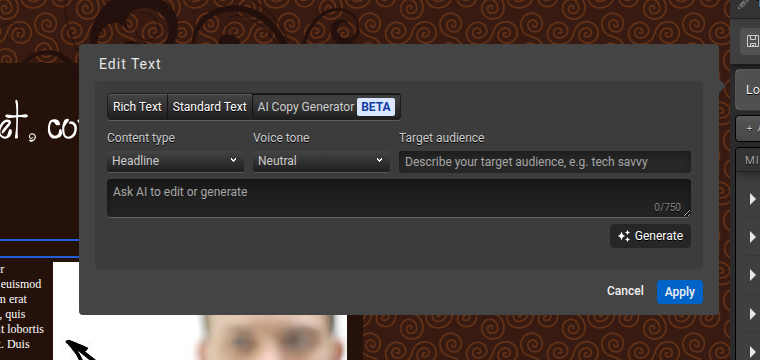
Generate or revise text
- Open a creative in Creative Studio and select a text element.
- Choose Edit Text, then open the AI Copy Generator tab.
- Select a content type: Headline, Subhead, Title, Button label, Question, Short paragraph, Long paragraph, or Text.
- Select a voice tone. Current options include Neutral, Formal, Informal, Humorous, Optimistic, Respectful, Assertive, Informative, and Persuasive.
- Describe the target audience, then enter an instruction in Ask AI to edit or generate. The prompt accepts up to 750 characters.
- Select Generate. Review the result and select Apply only when it is ready for the creative.
Prompt tips
- State the desired outcome, audience, and important facts.
- For a revision, explain what should change: length, clarity, tone, grammar, or call to action.
- Keep brand terms and required legal language in the prompt, then verify them in the result.
- AI output should always receive human review before publishing.
